Monday, March 9, 2015

DMVPN w GETVPN for encryption


I thought it would be cool to lab out a combination of DMVPN (Dynamic Multipoint VPN, utilizing multipoint GRE dynamic tunnels) with the integration of GETVPN. Group Encrypted Transport VPN, which utilizes a key server that distributes group keys to it's registered members and controls the group security associations between the peers. GETVPN does not use static ipsec tunnels or create the VPN frame work....you would need to have a vpn in place...DMVPN in this example, although GETVPN is best suited over MPLS.  BTW...a great guide for setting up and understanding DMVPN can be found here at firewall.cx:

CONFIGURING CISCO DYNAMIC MULTIPOINT VPN (DMVPN)


Below is my GNS 3 lab diagram. I started by using a single router to represent the internet. I also Port Address Translated the 2 spoke and hub routers public interfaces to allow the private hosts to communicate with the rest of the "Internet" to add some realism. The DMVPN config is below


------------------------------------------------------------------------------------------------------------------------

interface Tunnel0
 description mGRE DMVPN Tunnel


 ip address 192.168.1.1 255.255.255.0
 no ip redirects


 no ip split-horizon eigrp 1

no ip next-hop-self eigrp 1


ip nhrp authentication DMVPN

ip nhrp map multicast dynamic


 ip nhrp network-id 1


 tunnel source 11.11.11.1


 tunnel mode gre multipoint

router eigrp 1
 network 10.1.1.0 0.0.0.255
 network 192.168.1.0
These are the pertinent  parts of the DMVPN config. Nothing special with the physical interfaces- just assign them IPs and activate them. All the config is done on the tunnel interface- which is the fist thing you'll create.

This the hub config. You'll want to use a private address network for your tunnel interfaces.

You will definitely need to disable split-horizon for the EIGRP process running on the tunnel interface. If you don't, your spokes will never get eachothers routes, only the updates from the hubs routes will be present on the spokes. Also if you want direct communication\routes between spoke routers, and not send all traffic via the hub, then disable next-hop-self as well for your EIGRP,

Set your authentication string to allow queries and updates to the NHRP database

Map multicast traffic to the spokes dynamically- this is used and necessary for routing protocols that use multicast packets (ie EIGRP in this case) in their routing updates.

Set the network ID- which will be the same for all participating routers in the VPN cloud.

Your tunnel source is the public facing interface IP.

This command enables the tunnel interface as a multipoint GRE tunnel.

This is your basic advertising of your routers networks- you'll need to add the tunnel network as well in order for EIGRP adjacencies to form.

--------------------------------------------------------------------------------------------------------------------------
Next is the spoke config for the VPN........

--------------------------------------------------------------------------------------------------------------------------


interface Tunnel0
 description mGRE DMVPN Tunnel
 ip address 192.168.1.3 255.255.255.0
 no ip redirects
 ip nhrp authentication DMVPN
 ip nhrp map multicast dynamic
 ip nhrp map 192.168.1.1 11.11.11.1
 ip nhrp map multicast 11.11.11.1
 ip nhrp network-id 1


 ip nhrp nhs 192.168.1.1

 tunnel source FastEthernet0/0
 tunnel mode gre multipoint

router eigrp 1
 network 10.3.3.0 0.0.0.255
 network 192.168.1.0
ip route 0.0.0.0 0.0.0.0 33.33.33.254


ip access-list extended NATISP
 deny   ip 192.168.0.0 0.0.255.255 any
 deny   ip 10.3.3.0 0.0.0.255 10.0.0.0 0.255.255.255
 permit ip 10.3.3.0 0.0.0.255 any

Almost the same thing for the spokes...but here are the differences:


Maps the hubs NHS tunnel IP to it's public IP

Send multicast traffic to the hub, so that the hub processes it- this is essential for EIGRP to form adjacencies! They will not form otherwise, unless maybe you specify static EIGRP neighbors from hub to spoke, which use unicast instead.

This command tells the spoke who the hub NHRP router is-- in this case GM-R1

The tunnel source is specified as the public interface itself and not the IP- this can be used in case the IP changes dynamically.


I also have a static default route pointing to my ISP router so that clients behind my spoke router can get out to the internet.

What I did here is, deny the private networks in including the tunnel network, from being being natted. I had PAT overloaded the public interface on the spoke routers so that clients can NAT out to the internet, but we obviously don't want the VPN traffic to NAT.

--------------------------------------------------------------------------------------------------------------------------
The other spoke is the same exact thing as the first one....

At this point you should see the peers that have GRE tunnels- as expected, there are 2 tunnels connected to the hub router:

GM-R1#show dmvpn

Interface: Tunnel0, IPv4 NHRP Details
Type:Hub, NHRP Peers:2,

 # Ent  Peer NBMA Addr Peer Tunnel Add State  UpDn Tm Attrb
 ----- --------------- --------------- ----- -------- -----
     1 33.33.33.3          192.168.1.3    UP 03:07:36     D
     1 44.44.44.44         192.168.1.4    UP 02:59:23     D


You should have EIGRP neighborships between the hub and each spoke:

GM-R1#show ip eigrp neighbors
EIGRP-IPv4 Neighbors for AS(1)
H   Address                 Interface              Hold Uptime   SRTT   RTO  Q  Seq
                                                   (sec)         (ms)       Cnt Num
1   192.168.1.4             Tu0                      10 02:10:58  166  1470  0  31
0   192.168.1.3             Tu0                      10 02:14:55  179  1470  0  28

And, if all is well each router should have routes to the other routers networks- and you should be able to ping and pass traffic at this point.

GM-R4#show ip route

Gateway of last resort is 44.44.44.254 to network 0.0.0.0

S*    0.0.0.0/0 [1/0] via 44.44.44.254
      10.0.0.0/8 is variably subnetted, 4 subnets, 2 masks
D        10.1.1.0/24 [90/26882560] via 192.168.1.1, 02:12:47, Tunnel0
D        10.3.3.0/24 [90/28162560] via 192.168.1.1, 02:00:59, Tunnel0
C        10.4.4.0/24 is directly connected, FastEthernet0/1
L        10.4.4.4/32 is directly connected, FastEthernet0/1
      44.0.0.0/8 is variably subnetted, 2 subnets, 2 masks
C        44.44.44.0/24 is directly connected, FastEthernet0/0
L        44.44.44.44/32 is directly connected, FastEthernet0/0
      192.168.1.0/24 is variably subnetted, 2 subnets, 2 masks
C        192.168.1.0/24 is directly connected, Tunnel0
L        192.168.1.4/32 is directly connected, Tunnel0


Ok......so here's the GETVPN part...utilizing the GDOI protocol running on UDP port 848. The IKE SAs are setup between the group members and the Key Server...communicating over the public internet. Since my key server sits behind R1 on the private network, I had to port forward UDP 848 and IKE 500 and 4500 (when behind NAT, which is my case) on R1- I used a static NAT mapping IP 11.11.11.5 to the private IP of the KS server......

I'll start with the Key Server setup here:

--------------------------------------------------------------------------------------------------------------------------


KS-R5(config)#crypto key generate rsa label VPNKEY1 modulus 1024 exportable


crypto isakmp policy 1
 encr aes
 authentication pre-share
 group 2
 lifetime 14400
crypto isakmp key getvpn address 0.0.0.0      


crypto ipsec transform-set TRANS1 esp-aes esp-sha-hmac
 mode tunnel
!
crypto ipsec profile IPSEC1
 set transform-set TRANS1


crypto gdoi group GDOI1
 identity number 1
 server local
  rekey algorithm aes 128
  rekey lifetime seconds 14400
  rekey retransmit 15 number 2
  rekey authentication mypubkey rsa VPNKEY1
  rekey transport unicast
  sa ipsec 10
   profile IPSEC1
   match address ipv4 GETVPN-ACL
   replay counter window-size 64
  address ipv4 10.1.1.5

crypto map CRYPTO1 10 gdoi
 set group GDOI1

no ip routing
ip default-gateway 10.1.1.1

ip access-list extended GETVPN-ACL
 deny   udp any eq 848 any eq 848
 permit gre any any

You'll want to create an RSA keypair here, to use for signing the packets.


ISAKMP policy is defined here. I lazily used the 0.0.0.0 (any ip) as the "allowed" addresses for the key usage among the GDOI members. You would want to restrict these to the public facing IP addresses of your member routers- use one line per address.


Your ipsec transform set and encryption types are set here.


Ipsec profile specifying your transform set


The gdoi group settings here. Note the reference to the rsa key generated earlier. You will also match the traffic that is to be encrypted via an ACL....and reference the ipsec profile you just created (IPSEC1)


You actually don't need to enable the crypto map on the interface of the key server since it sits on the private network-but I left it here for reference.


Here, I disabled routing and set the KS's default gateway as if it was just a host unit.

 I denied the gdoi control traffic on udp port  848 here....and permitted GRE tunnel packets, which includes everything running through the DMVPN. This ACL will be downloaded by the member routers too.


--------------------------------------------------------------------------------------------------------------------------

Here's is one of the Group Member routers- R1-you'll do the same for R3 and 4, with the exception of addressing the KS by it's statically natted public IP.

--------------------------------------------------------------------------------------------------------------------------

ip nat inside source list NATISP interface FastEthernet0/0 overload
ip nat inside source static udp 10.1.1.5 500 11.11.11.5 500 extendable
ip nat inside source static udp 10.1.1.5 848 11.11.11.5 848 extendable
ip nat inside source static udp 10.1.1.5 4500 11.11.11.5 4500 extendable

crypto isakmp policy 1
 encr aes
 authentication pre-share
 group 2
 lifetime 14400
crypto isakmp key getvpn address 10.1.1.5


crypto gdoi group GDOI1
 identity number 1
 server address ipv4 10.1.1.5
!
!
crypto map CRYPTO1 10 gdoi
 set group GDOI1

interface FastEthernet0/0
 ip address 11.11.11.1 255.255.255.0
 ip nat outside
 speed auto
 duplex auto
 crypto map CRYPTO1

With this router- I Natted an additional public IP (11.11.11.5) to the necessary ports on the KS server sitting on the private network.


Isakmp policy here, and, with this router, I referenced the KS server by it's real private IP address- on R3 and 4, you'll use the public natted IP defined above to reach the KS.


GDOI group- basically specifying the KS server- same thing here- use the public natted IP address of the KS on the remote routers- use the real IP here.


Tie it in w the crypto map- CRYPTO1


"Turn on" the Crypto map for the outside public facing interface.


--------------------------------------------------------------------------------------------------------------------------

As soon as you enable the crypto map on the outside interface- the member router should register with the KS, and display the console output similar to below:

GM-R1(config-if)#crypto map CRYPTO1
GM-R1(config-if)#
*Mar 9 22:05:44.991: %CRYPTO-5-GM_REGSTER: Start registration to KS 10.1.1.5 for group GDOI1 using address 10.1.1.1
GM-R1(config-if)#
*Mar 9 22:05:45.007: %CRYPTO-6-GDOI_ON_OFF: GDOI is ON
GM-R1(config-if)#
*Mar 9 22:06:06.455: %GDOI-5-GM_REKEY_TRANS_2_UNI: Group GDOI1 transitioned to Unicast Rekey.
*Mar 9 22:06:06.459: %GDOI-5-SA_KEK_UPDATED: SA KEK was updated
*Mar 9 22:06:06.475: %GDOI-5-SA_TEK_UPDATED: SA TEK was updated
*Mar 9 22:06:06.583: %GDOI-5-GM_REGS_COMPL: Registration to KS 10.1.1.5 complete for group GDOI1 using address 10.1.1.1
*Mar 9 22:06:06.643: %GDOI-5-GM_INSTALL_POLICIES_SUCCESS: SUCCESS: Installation of Reg/Rekey policies from KS 10.1.1.5 for group GDOI1 & gm identity 10.1.1.1

On the KS server, after configuring the other member routers, you should see Security Associations with each of the 3 member routers, as shown here:

KS-R5#show crypto isakmp sa
IPv4 Crypto ISAKMP SA
dst             src             state          conn-id status
10.1.1.5        11.11.11.1      GDOI_IDLE         1007 ACTIVE
10.1.1.5        44.44.44.44     GDOI_IDLE         1008 ACTIVE
10.1.1.5        33.33.33.3      GDOI_IDLE         1005 ACTIVE

This will show you group info, number of members, key lifetimes, group ACL etc

KS-R5#show crypto gdoi
GROUP INFORMATION

    Group Name               : GDOI1 (Unicast)
    Group Identity           : 1
    Crypto Path              : ipv4
    Key Management Path      : ipv4
    Group Members            : 3
    IPSec SA Direction       : Both
    Group Rekey Lifetime     : 14400 secs
    Group Rekey
        Remaining Lifetime   : 9195 secs
    Rekey Retransmit Period  : 15 secs
    Rekey Retransmit Attempts: 2
    Group Retransmit
        Remaining Lifetime   : 0 secs

      IPSec SA Number        : 10
      IPSec SA Rekey Lifetime: 3600 secs
      Profile Name           : IPSEC1
      Replay method          : Count Based
      Replay Window Size     : 64
      SA Rekey
         Remaining Lifetime  : 2213 secs
      ACL Configured         : access-list GETVPN-ACL

     Group Server list       : Local

This is the SA from a member router perspective

GM-R3#show crypto isakmp sa
IPv4 Crypto ISAKMP SA
dst             src             state          conn-id status
33.33.33.3      10.1.1.5        GDOI_REKEY        1004 ACTIVE
11.11.11.5      33.33.33.3      GDOI_IDLE         1003 ACTIVE

And again, GDOI info from a group member router- reference the KS via it's public IP

GM-R3#show cry gdoi
GROUP INFORMATION

    Group Name               : GDOI1
    Group Identity           : 1
    Crypto Path              : ipv4
    Key Management Path      : ipv4
    Rekeys received          : 1
    IPSec SA Direction       : Both

     Group Server list       : 11.11.11.5

    Group member             : 33.33.33.3       vrf: None
       Version               : 1.0.4
       Registration status   : Registered
       Registered with       : 11.11.11.5
       Re-registers in       : 1426 sec
       Succeeded registration: 2
       Attempted registration: 6
       Last rekey from       : 10.1.1.5
       Last rekey seq num    : 6
       Unicast rekey received: 1
       Rekey ACKs sent       : 1
       Rekey Rcvd(hh:mm:ss)  : 01:27:29
       allowable rekey cipher: any
       allowable rekey hash  : any
       allowable transformtag: any ESP

    Rekeys cumulative
       Total received        : 1
       After latest register : 0
       Rekey Acks sents      : 1

 ACL Downloaded From KS 11.11.11.5:
   access-list   deny udp any port = 848 any port = 848
   access-list   permit gre any any

KEK POLICY:
    Rekey Transport Type     : Unicast
    Lifetime (secs)          : 8521
    Encrypt Algorithm        : AES
    Key Size                 : 128
    Sig Hash Algorithm       : HMAC_AUTH_SHA
    Sig Key Length (bits)    : 1024

TEK POLICY for the current KS-Policy ACEs Downloaded:
  FastEthernet0/0:
    IPsec SA:
        spi: 0x4F0F578E(1326405518)
        transform: esp-aes esp-sha-hmac
        sa timing:remaining key lifetime (sec): (1540)
        Anti-Replay : Disabled


At this point, you'll want to send some pings over the network via the tunnel-  the encaps and decaps should increment, confirming that the traffic is indeed being encrypted via GETVPN. 

GM-R3#show crypto ipsec sa

interface: FastEthernet0/0
    Crypto map tag: CRYPTO1, local addr 33.33.33.3

   protected vrf: (none)
   local  ident (addr/mask/prot/port): (0.0.0.0/0.0.0.0/47/0)
   remote ident (addr/mask/prot/port): (0.0.0.0/0.0.0.0/47/0)
   current_peer 0.0.0.0 port 848
     PERMIT, flags={}
    #pkts encaps: 964, #pkts encrypt: 964, #pkts digest: 964
    #pkts decaps: 438, #pkts decrypt: 438, #pkts verify: 438
    #pkts compressed: 0, #pkts decompressed: 0
    #pkts not compressed: 0, #pkts compr. failed: 0
    #pkts not decompressed: 0, #pkts decompress failed: 0
    #send errors 0, #recv errors 64

     local crypto endpt.: 33.33.33.3, remote crypto endpt.: 0.0.0.0
     path mtu 1500, ip mtu 1500, ip mtu idb FastEthernet0/0
     current outbound spi: 0x501F7AB8(1344240312)
     PFS (Y/N): N, DH group: none

     inbound esp sas:
      spi: 0x501F7AB8(1344240312)
--------------------------------------------------------------------------------------------------------------------------

So there you have it- 2 cool vpn technologies combined - hope this is helpful and thanks for reading. Also, here's a few excellent references on DMVPN , GETVPN, and IPSEC\IKE\ISAKMP in general.

http://www.firewall.cx/cisco-technical-knowledgebase/cisco-routers/901-cisco-router-dmvpn-configuration.html

http://www.cisco.com/c/en/us/products/collateral/ios-nx-os-software/getvpn-solution-managed-services/prod_white_paper0900aecd804c363f.html


Also, here are the GNS3 Lab files- downloadable here:

Download Lab


Sunday, September 28, 2014

Migrate from Hyper-v VHDX to VMware VMDK on same hardware


I was tasked with migrating VMs from Hyper-V 2012-R2 to VMware's ESXi 5.5 without the luxury of an additional box to install ESXi and just migrate them over with VMware Converter.  So this was an offline tear down\migration of the original Hyper-V server.

I read a few posts about going from vhdx format to vmdk for offline VMs. Seemed easy enough. Use the Hyper-v server's PowerShell to go from vhdx to vhd, like this


Convert-VHD -Path "path to your vhdx" -DestinationPath "path to save your converted vhd"

Then I used Starwinds V2V converter (which you can download for free) to take the vhd to vmdk

http://www.starwindsoftware.com/converter

So I have the vms all set for ESXi, shuffled off and converted- I attach the disks to the newly created machines and get the dreaded 

Failed to start the virtual machine.
Module DevicePowerOn power on failed.
Unable to create virtual SCSI device for scsi0:0, '/vmfs/volumes/50f8922d-eb60e350-2100-6c626d42c9ce/SSD08004.VMAD01.LOCAL__C_Drive-s001.vmdk'
Failed to open disk scsi0:0: Unsupported or invalid disk type 7. Ensure that the disk has been imported


So what to do now? What I should have done to begin with. Download and use the newest version of vCenter Converter Standalone! Just converting to vmdk w starwind is not good enough- there are formatting differences between Workstation, Player and Infrastructure products like ESX and ESXi and must be converted properly.

With my vms installed on the ESXi server but still un-startable, I used Converter to go from 

VMware Infrastructure ------> VMware Player 6.0     (Use "Not pre-allocated" option to keep your disks thin-provisioned if you want)

and then back.....

VMware Workstation or other VMware virtual machine (vmx file)  --->  ESXi host  - same thing, choose "thin provisioned disk" in the destination options if you want

Also, with 2012\Win 8 and above. make sure to boot from EFI and not BIOS--- and I'm back in business!

Another snafu that happens every time, especially with Linux based VMs, is the virtual nic hardware associated with the underlying OS changes, since obviously the nic MAC address changes when the VM is re-imported\moved over to a new system like this. A lot of dependency services (ie Asterisk, etc) refer to the specific nic name in their configs.....and will break if it's changed. So you may have had your OS using eth0 , and now when you move the vm, that nic is apparently gone, and eth1 is active...OR..no nic at all is active when you issue ifconfig at the shell.

You may need to assign an IP to your box to get connectivity - here's the pertinent Linux commands

ifconfig -a                                                                                view all interfaces

ifconfig eth1 up                                                                       enable an interface

ifconifg eth1 192.168.0.xx netmask 255.255.255.0               set static IP

sudo dhclient -v                                                                       view DHCP service info

dhclient -v -r                                                                            release any address from interfaces

dhclient eth1                                                                            enable DHCP on an interface

route add default gw 192.168.x.x eth1                                  add default gateway

route -v                                                                                     show active routes

yum install epel-release                                                          Extra Packages for Enterprise Linux

And the file that maps the MAC to the nic name is found here (at least on CentOS)

“/etc/udev/rules.d/70-persistent-net.rules“

You'll need to take note of your current active nics MAC address, and change the name of the nic to match it- using the previously named nic that worked before (eth0 is this example) Use the dreaded VI editor form the shell, or WinSCP in,... Webmin....whatever you prefer. See the entry example below- there will most likely be 2 entries or more- one for the old nic, and one for the new active one. You can safely delete the old mac entry also...since it's a "tombstoned" device


# PCI device 0×8086:0x100f (e1000)SUBSYSTEM==”net”, ACTION==”add”, DRIVERS==”?*”, ATTR{address}==”00:50:56:34:0f:38″, ATTR{type}==”1″, KERNEL==”eth*”, NAME=”eth0


So that's it... hopefully this post saves somebody a little aggravation and time!


Friday, May 16, 2014

Send Exchange Users a Password Expiry Email with Power Shell

I thought this was a cool solution to let our Exchange users know their passwords are about to expire within 14 days, giving them an opportunity to change them before they do. Changing passwords is NOT possible out of the box via OWA with Exchange 2013....and I've seen quite a few sample scripts out there to try and cope with the same thing. Because it's enviable that somebody will be away, on vacation, or off on maternity leave, their password expires and now it's an urgent help desk call!

So...here's the script ....the heart of it really is the "msDS-UserPasswordExpiryTimeComputed" attribute that gets converted to an actual date. The current date is then subtracted to from the expirytime date to get the number of days remaining. A great blog post from Andreas helped me out here:

http://ahultgren.blogspot.com/2011/05/powershell-active-directory-and.html

Check it out...it explains the attribute calculations very well. So, all that get's wrapped up in a Foreach for every user parsed in your AD, and if the calculated days remaining are between 14 and 0, they'll get sent in email message via the Send-Mailmessage line at the bottom. Pop that into a scheduled task and you're good to go....

Ok tech peeps...hope this helps you out and results in happy exchange users!

*****************************************************************************

clear-host

Write-host "Script by DTopo 2014" -ForegroundColor Green

$ErrorActionPreference= 'silentlycontinue' # "needed to stop execution errors from displaying"

$adusers= Get-ADUser -filter ‘Enabled -eq $true -and PasswordNeverExpires -eq $false -and PasswordExpired -eq $false’ -SearchBase "OU=Users,OU=NY,DC=yourdomain,DC=com" -properties passwordlastset,passwordneverexpires,mail

foreach ($user in $adusers)
{$til = (([datetime]::FromFileTime((get-aduser $user -ErrorAction SilentlyContinue -properties "msDS-UserPasswordExpiryTimeComputed")."msDS-UserPasswordExpiryTimeComputed"))-(get-date)).days
if(($til -lt "14") -and ($til -gt 0)) {write-host $user.Name "last set their password on " $user.passwordlastset "it will expire again in " $til " days" -foregroundcolor cyan


$tpsuser=$user.Name
$emailaddress=$user.mail
echo $emailaddress
echo $tpsuser


$body =”
Dear $tpsuser,
<p> Your Windows/Email Password will expire in $til days!<br>
<br>
To change your password on a company PC, press CTRL ALT Delete and choose Change Password<br>
<br>
If you are not on a district PC, please login to your OWA webmail (https://mail.yourdomain.com/owa), click on the little gear in upper right corner-choose Options, then Settings, then Password<br>
<br>
NOTE: If you change your Windows/Email Password, you must also change it on your Mobile Device (iPhone, iPad, Android).<br>
<br>
**Also, if your password has already expired, you will NOT be able to use OWA to change it. You will then need to log on to a district PC.**<br>
<br>
<p>If you need assistance, please contact your building technician or call Technology...<br>
<br>
<br>
<p>Thank you.......<br>
<br>
Technology Department<br>
Your Company<br>
xxx-XXX-xxxx
</P>”

Send-Mailmessage -smtpServer mail.yourdomain.com -from noreply@yourdomain.com -to $emailaddress -Cc "somebody@yourdomain.com","somebodyelse@yourdomain.com" -subject "TPS Password will expire in $til days" -body $body -bodyasHTML -priority High -Verbose

}
}


Friday, April 18, 2014

Rename Exchange-AD User with Power Shell Script

This is probably not the most elegant PS script you'll ever see, and will most likely have experienced coders laughing and squirting milk from their noses (or whatever experienced coders drink) ...but hey..it works!

I searched quite a bit to find a script that would take care of all the attributes needed to rename a AD\Exchange user's surname, truncate it to fit our naming convention, rename their home directory, email addresses etc from the command line....all to no avail. So I pieced together what you see below. There's comments and echos for every function\ line, so it's easy to follow.

Now, I'm just waiting for somebody to get to get married so I can put this thing to work! Also, thanks to all the references (see comments in script) and their respective sites and authors that really helped me out....

Function Begin {            
Clear-Host            
write-host "***********************************************************************" -ForegroundColor Red            
Write-host "Script by created by Dennis Topo Jr 2014" -ForegroundColor Cyan            
write-host "***********************************************************************" -ForegroundColor Red            
write-host             
$firstname=Read-Host "Enter current First name of user to be renamed (ie. John)"            
write-host            
$lastname=Read-Host "Enter current Last name of user to be renamed (ie. Smith)"            
$fullname="$firstname" +" " + "$lastname"            
            
get-aduser -Filter {name -eq $fullname}            
            
$Choice=Read-Host "Do you want to rename the above user? (if you don't see any output, user is NOT in AD, or you typed it wrong!) Yes(Y) or No(N)?"            
If (($Choice -eq 'Y') -or ($Choice -eq 'y')) {Prompt1}            
if (($Choice -eq 'N') -or ($Choice -eq 'n')) {Begin}            
Else {Begin}            
            
            
}            
                        
Function Prompt1 {            
write-host            
$newsur=Read-host "Enter NEW Sur Name for User"            
write-host            
            
# set first initial of user account name            
$firstsam=$firstname.substring(0,1)            
            
# set CURRENT sur name to 7 chraraters only            
# count the characters in the last name             
$count=Measure-Object -InputObject $lastname -Character | select -expand Characters             
             
# If the count is less than 7, use that number, if not, set it to 7            
If ($count -lt 7 ){$numberx = $count}Else{$numberx = 7}            
$sn7 = $lastname.Substring(0, $numberx)            
            
            
$samaccount=$firstsam+$sn7            
            
            
# set NEW sur name to 7 chraraters only            
# count the characters in the last name             
$count=Measure-Object -InputObject $newsur -Character | select -expand Characters             
             
# If the count is less than 7, use that number, if not, set it to 7            
If ($count -lt 7 ){$numberx = $count}Else{$numberx = 7}            
$newsn7 = $newsur.Substring(0, $numberx)            
            
write-host "***********************************************************************" -ForegroundColor Green            
Write-Host "Echo out all the variables" -ForegroundColor Green            
Write-Host            
Write-Host            
write-host "***********************************************************************" -ForegroundColor Yellow            
$samaccount=$firstsam+$sn7            
echo "Current Login Account is: $samaccount"            
            
$newsam=$firstsam+$newsn7            
echo "New Login Account is: $newsam"            
write-host "***********************************************************************" -ForegroundColor Yellow            
            
$curemail=$sn7+$firstsam+"@yourdomain.com"             
echo "Current Primary Email is: $curemail"            
            
$newemail=$newsn7+$firstsam+"@yourdomain.com"             
echo "New Primary Email is: $newemail"            
write-host "***********************************************************************" -ForegroundColor Yellow            
            
$cursecemail=$firstsam+$sn7+"@yourdomain.com"            
echo "Current Secondary Email is: $cursecemail"            
            
$newsecemail=$firstsam+$newsn7+"@yourdomain.com"            
echo "New Secondary Email is: $newsecemail"              
write-host "***********************************************************************" -ForegroundColor Yellow            
            
$newfullname="$firstname" +" " + "$newsur"            
echo "New Name is: $newfullname"            
write-host "***********************************************************************" -ForegroundColor Yellow            
            
$newdisplayname="$newsur" +"," +" "+ "$firstname"            
echo "New Display Name is: $newdisplayname"            
write-host "***********************************************************************" -ForegroundColor Yellow            
            
$newprinname="$newsam"+"@yourdomain.com"            
echo "New Principle Name is: $newprinname"            
write-host "***********************************************************************" -ForegroundColor Yellow            
            
# Get's the users Home Directory            
$hdir=get-aduser $samaccount -Properties homeDirectory | select -ExpandProperty homeDirectory            
echo "Current Home Directory Path is: $hdir"            
            
# Replace current Home Dir name with new one, which is the new sam account ie #$a = $a.Replace("Scriptign", "Scripting")            
$newhdir=$hdir.Replace("$samaccount", "$newsam")            
echo "New Home Directory Path is: $newhdir"            
write-host "***********************************************************************" -ForegroundColor Yellow            
            
$alias=$firstsam+$sn7            
echo "Current Alias is: $alias"            
            
$newalias=$firstsam+$newsn7            
echo "New Alias is: $newalias"            
write-host "***********************************************************************" -ForegroundColor Yellow            
            
Exchange            
}            
            
            
Function Exchange {            
            
pause            
Write-Host "Create and Import PowerShell Session to Exchange Server" -ForegroundColor Green            
$Session = New-PSSession -ConfigurationName Microsoft.Exchange -ConnectionUri http://exchange.yourdomain.com/PowerShell/ -Authentication Kerberos            
             
 Import-PSSession $Session -AllowClobber   #By default, Import-PSSession imports all commands except for commands that have the same names as commands in the current session. To import all the commands, use the AllowClobber parameter.            
            
 pause            
 Write-Host "Disable Address Policy for Mailbox" -ForegroundColor Green            
 Set-Mailbox -Identity $alias -EmailAddressPolicyEnabled $false            
            
 pause            
 Write-Host "Remove Current Secondary Email Address" -ForegroundColor Green            
 Set-Mailbox -Identity $alias -EmailAddresses @{Remove="$cursecemail"}            
            
 pause            
 Write-Host "Rename User Object in AD" -ForegroundColor Green            
 get-aduser $samaccount | Rename-ADObject -NewName "$newfullname"            
            
 pause            
 Write-Host "Change AD Attributes like Display Name, SAM Account, UPN, and EMail" -ForegroundColor Green            
 get-aduser $samaccount |Set-ADUser -Surname $newsur -DisplayName "$newdisplayname" -SamAccountName $newsam -UserPrincipalName $newprinname -EmailAddress $newemail            
            
 pause            
 Write-Host "Set New Primary Address and Alias" -ForegroundColor Green            
 Set-Mailbox -Identity $alias -PrimarySmtpAddress $newemail  -Alias $newalias            
            
 pause            
 Write-Host "Enable Address Policy for Mailbox" -ForegroundColor Green            
 Set-Mailbox -Identity $newalias -EmailAddressPolicyEnabled $true            
            
 pause            
 Write-Host "Disable Address Policy for Mailbox" -ForegroundColor Green            
 Set-Mailbox -Identity $newalias -EmailAddressPolicyEnabled $false            
            
 pause            
 Write-Host "Set New Secondary Email Address" -ForegroundColor Green            
 Set-Mailbox -Identity $newalias -EmailAddresses $newsecemail             
            
 pause            
 Write-Host "Remove OLD Primary Email Address- Should not be necessary though. Setting Secondary Add above should clear out all addresses." -ForegroundColor Green            
 Set-Mailbox -Identity $newalias -EmailAddresses @{Remove="$curemail"}            
             
 pause            
 Write-Host "Enable Address Policy for Mailbox" -ForegroundColor Green            
 Set-Mailbox -Identity $newalias -EmailAddressPolicyEnabled $true            
            
 pause            
 Write-Host "Remove PS Session to Exchange" -ForegroundColor Green            
 Get-PSSession | Remove-PSSession            
            
 pause            
 Write-Host "Set Home Directory Folder Path" -ForegroundColor Green            
 Set-ADUser -Identity $newalias -HomeDirectory $newhdir -Verbose            
            
 pause            
 Write-Host "Rename Home Directory" -ForegroundColor Green             
 Rename-Item -Path "$hdir" -NewName $newalias -Force -Verbose            
            
 pause            
 Write-Host "Renamed User Details" -ForegroundColor Green            
 Get-ADUser $newalis -Properties * | FL CN,Company,DisplayName,DistinguishedName,EmailAddress,mailNickname,HomeDirectory,SamAccountName,proxyAddresses,UserPrincipalName            
            
 pause            
            
 Begin            
            
}            
            
# Reference             
#$a = $a.Replace("Scriptign", "Scripting") 
           
# http://exchangeserverpro.com/manually-configuring-email-addresses-for-exchange-server-2013-recipients-using-powershell/   
         
# http://technet.microsoft.com/en-us/library/ee617225.aspx 
           
# http://chinnychukwudozie.com/2013/11/18/renaming-ad-user-object-surname-property/            
# http://dmitrysotnikov.wordpress.com/2010/08/13/manage-email-addresses-without-exchange-cmdlets/  
          
# http://social.technet.microsoft.com/Forums/exchange/en-US/6e005cc5-de5a-4ed8-bb65-fd299e431d65/how-to-removing-x400-addresses-via-powershell?forum=exchangesvradminlegacy      
      
# http://technet.microsoft.com/en-us/library/bb123794(v=exchg.150).aspx            
#$addrs = $mbx.EmailAddresses | Where {$_.Prefixstring -ne "X400"}            


Clear-Host            
            
Begin            

Saturday, March 22, 2014

Cisco ASA with WCCP redirect to Squid proxy


Getting traffic redirection\interception from my ASA to my Squid proxy caused me a significant amount of pain! There's a great deal of blog posts out there on how to achieve this transparent redirect, but all are just a little different. I'm sure a seasoned Linux guy would have gotten this all done much quicker..but that was not the case for me! There's so many nuances and variants of Linux, and different ways to do the same thing, it makes a single clear cut procedure unlikely.

Anyway....the reasoning to setup a transparent proxy at all is little cloudy. It would have been much easier to point my client browsers to the the Squid box, and be done with it. If you're a windows shop, and use AD and Group Policy- then this is easy! But who wants to take the easy route? )

Squid proxy is pretty cool...plus it's free and easy to install, and well documented on line. I also paired my Squid box with Squid guard, for content and url filtering- again free.

Here are the main article I used as a guide to install and setup Squid with Squid Guard. Thanks to the author at dancourses!


To start, I used CentOS 6.5 for my proxy OS....with a minimal desktop install option- I like to have some gui for Linux. I used the latest Squid build at the time- 3.4.x. My ASA is a 5520 running 8.4.2 version software. I'll also assume you have experience editing linux config files- the metheod is up to you...if you're a cool terminal-only guy, and want to use VI for everything, by all means- I like Webmin and GEdit myself!

Once you have Squid and Squid Guard up and working a  conventional proxy - browsers pointing to the IP of the Squid box on port 3128...and want to setup a transparent redirect using Cisco's Web Cache Communication Protocol like I did, then read on.

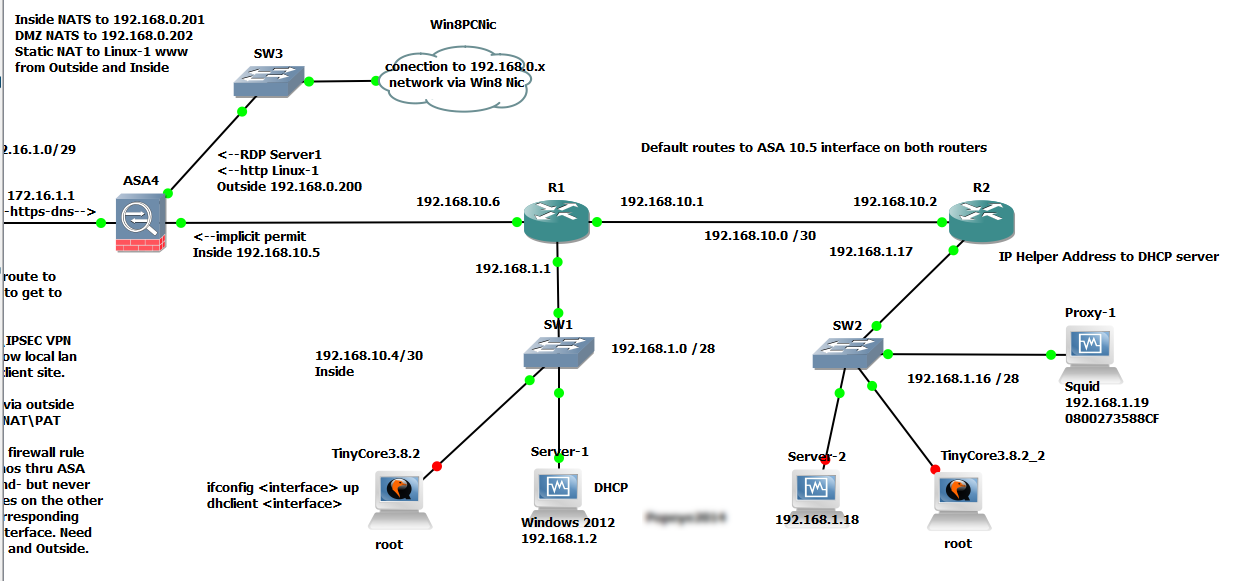
My lab network is shown below- running in GNS3 - which is an amazing piece of software and essential for anybody in the networking field looking to gain knowledge or to simulate an environment for testing.


Obviously, ensure you have connectivity throughout your network and to the internet- we'll start with the ASA first.

Define the proxy server(s) that can register as a WCCP cache engine on the ASA , permit the subnets you want to be redirected, and deny your proxy server from being redirected.

access-list wccp-server extended permit ip host 192.168.1.19 any
access-list wccp-server remark Proxy servers that can register to WCCP

access-list wccp-traffic extended deny ip host 192.168.1.19 any
access-list wccp-traffic extended permit tcp 192.168.1.0 255.255.255.0 any eq www
access-list wccp-traffic extended permit tcp 192.168.1.0 255.255.255.0 any eq https
access-list wccp-traffic extended permit tcp 192.168.10.0 255.255.255.0 any eq www
access-list wccp-traffic extended permit tcp 192.168.10.0 255.255.255.0 any eq https
access-list wccp-traffic extended deny ip any any
access-list wccp-traffic remark Exclude proxy server from redirection- ID redirected subnets\clients

Next, tie in the WCCP config with the access lists you just created, and define the redirect interface, which would be your inside interface. Note that the proxy box and the clients must sit behind the same interface for this to work, per Cisco.

wccp web-cache redirect-list wccp-traffic group-list wccp-server

wccp interface inside web-cache redirect in

The other caveat with this is the WCCP Router ID....the ASA will pick the highest numbered IP to use as it's WCCP ID...this will be the source IP for the directed GRE packets coming from your ASA to your Squid proxy. So...it's probably best to design your IP scheme with this in mind...or else you'll have to ensure you have routes to any other interfaces that might be your WCCP ID. Mine is the inside interface at 192.168.10.5.

Next up- the squid.conf file....found in /etc/squid

I added these right at the end of the file. Note the intercept port- we'll use another port for that- 3129, and keep the stock 3128 port for normal proxying. Also, there's your WCCP Router ID IP.


# Intercept mode
http_port 3129 intercept

# WCCP Router IP- Inside ASA
wccp2_router 192.168.10.5

# forwarding
wccp2_forwarding_method gre

# GRE return method gre
wccp2_return_method gre

# standard web cache, no auth
wccp2_service standard 0


Now, restart Squid: service squid restart and it should register with the ASA.

On the ASA, do a show wccp and you should see that it has a cache engine (your squid box) registered.


Now for the OS adjustments on the Squid\CentOS box. I created a script called ifup-local in /sbin. In CentOS, this file is called when any interface is brought up. So just make it executable, and it will be fired up at system boot.

#!/bin/bash

# Setup and bring up the wccp\gre interface

modprobe ip_gre
ip tunnel add wccp0 mode gre remote 192.168.10.5 local 192.168.1.19 dev eth0
ifconfig wccp0 192.168.1.19 netmask 255.255.255.255 up


# disable rp_filter, or the packets will be silently discarded

echo 0 >/proc/sys/net/ipv4/conf/wccp0/rp_filter
echo 0 >/proc/sys/net/ipv4/conf/eth0/rp_filter

# enable ip-forwarding and redirect packets to squid

echo 1 >/proc/sys/net/ipv4/ip_forward

# catch the gre encapsulated http traffic-decapsulate it, and send it to Squid on port 3129

iptables -t nat -A PREROUTING -i wccp0 -p tcp --dport 80 -j DNAT --to-destination 192.168.1.19:3129

At this point, restart you Squid server. And go to a client browser...and hit the internet. The ASA should be catching your http requests, packing them up into GRE packets, and sending them to Squid. CentOS will encapsulate them, send them to Squid on port 3129. and then proxy the client requests as normal. And if you have Squid Guard, or another filtering application, you should be blocking content as well...won't that make your users happy!?

Here's a screen shot of a Wire Shark capture taken at eth0 of the Squid server when requesting a web site. The first TCP SYN packet is high lighted. You can see the GRE encapsulated header from the ASA there, with the request from the client to the web site server. The rest that follows set up the communication between the web site and the client with more SYNs and ACKs...then the actual HTTP GETs, requesting the content.


That's it! It is simple enough - just took me time to get the right config on the Linux side- the iptables command at the end, with the DNAT directive did it for me. The REDIRECT directive you may see on other blogs, did not work...it wasn't decapsulating the packets.


Additional reference for the Squid Wikis:

Sunday, February 9, 2014

Troubleshoot failed Incoming emails in Exchange 2013 with Symantec Mail Security for Exchange

I thought I'd put up some of my notes used to track and troubleshoot failures of incoming emails. Most recently, our hosted Exchange server seems to be the center of the universe! Yes...in the eyes of our users, all missed and non delivered emails are somehow the fault our server and department! The hardest thing is getting enough basic information from our users so we have even a chance at tracking down the reason why an incoming message didn't make to our server safe and sound. I this basic list to remind folks what they need to give me so I can target the problem.  

·        ·           Email Address of failed sender
·          Date and Time the message was sent
·         Email Address(es) of the intended recipient(s)
·         A copy of the failed email message (if any)
·         Bounce back message\NDR from intended recipient (if any)
·         Attachment information: Size, File extension\type
·         Any other error information relating to the sending PC (ie virus alerts, connection errors, etc.)


Below are my notes in kind of a raw form- hopefully they prove usefully to somebody. This particular server hosts both the Mailbox and Client Access role...plus it's running Symantec Mail Security for Exchange-- so anything that makes it past the Connection Filtering agent (which checks incoming IPs wishing to connect to our server against our subscribed DNS Block lists) and the Default Front End receiver (all inbound SMTP mail), will subsequently be checked by the Symantec agents for content, viruses, etc. 

I realize this is not the normal setup. Most shops would have some sort of edge device and or load balancer that would scan the incoming mail before it reaches the MBX server...but we have a "condensed" setup if you will. Although traffic is firewalled via our ISP before it reaches our box


What I'm checking for here is why emails from Adrad.com are not making it to our recipients- here's the sequence and logs I used to find the culprit! 

Summary:

·         Exchange Connection Filtering logs
C:\Program Files\Microsoft\Exchange Server\V15\TransportRoles\Logs\FrontEnd\AgentLog
·         Front End Receive Logs
C:\Program Files\Microsoft\Exchange Server\V15\TransportRoles\Logs\FrontEnd\ProtocolLog\SmtpReceive
·         Message Tracking logs
C:\Program Files\Microsoft\Exchange Server\V15\TransportRoles\Logs\MessageTracking
·         Exchange Server  Application Log in Event Viewer (filter events to make log more manageable)
*********************************************************************************
Details:

Check the following logs in this order- note that exchange log entries are all time stamped in GMT time- so subtract 5 hours to get the adjusted military time for our zone. (EST)

Exchange Connection Filtering logs
C:\Program Files\Microsoft\Exchange Server\V15\TransportRoles\Logs\FrontEnd\AgentLog
Check this log FIRST!
If the sending server is on one of our block lists, then it's a done deal- won't go beyond here. Check the IP of the sending server from the CF logs- see if it's on other block lists, including SPAM Cop and Spamhaus (our lists) - in this case...adrad.com is clean! No entries here…

Front End Receive Logs
C:\Program Files\Microsoft\Exchange Server\V15\TransportRoles\Logs\FrontEnd\ProtocolLog\SmtpReceive
Check the Frontend to see if the message is even getting to our server at all. Search on sender and recipient email address and TIME message was sent!! Nice to have the TIME! This is crucial unless you want to aimlessly search tons of logs!
Note: Will not get subject here!
2014-01-14T16:20:36.117Z,EXCHANGE\Default Frontend EXCHANGE,08D0DAE814F1B85F,0,10.38.187.3:25,170.163.48.241:52202,+,,
2014-01-14T16:20:36.117Z,EXCHANGE\Default Frontend EXCHANGE,08D0DAE814F1B85F,1,10.38.187.3:25,170.163.48.241:52202,*,SMTPSubmit SMTPAcceptAnySender SMTPAcceptAuthoritativeDomainSender AcceptRoutingHeaders,Set Session Permissions
2014-01-14T16:20:36.117Z,EXCHANGE\Default Frontend EXCHANGE,08D0DAE814F1B85F,2,10.38.187.3:25,170.163.48.241:52202,>,"220 EXCHANGE.ourdomain.net Microsoft ESMTP MAIL Service ready at Tue, 14 Jan 2014 11:20:35 -0500",
2014-01-14T16:20:36.133Z,EXCHANGE\Default Frontend EXCHANGE,08D0DAE814F1B85F,3,10.38.187.3:25,170.163.48.241:52202,<,HELO wlfd1-sophos01.adrad.com,
2014-01-14T16:20:36.133Z,EXCHANGE\Default Frontend EXCHANGE,08D0DAE814F1B85F,4,10.38.187.3:25,170.163.48.241:52202,>,250 EXCHANGE.ourdomain.net Hello [170.163.48.241],
2014-01-14T16:20:36.164Z,EXCHANGE\Default Frontend EXCHANGE,08D0DAE814F1B85F,5,10.38.187.3:25,170.163.48.241:52202,<,MAIL FROM:<gina.coffin@adrad.com>,
2014-01-14T16:20:36.164Z,EXCHANGE\Default Frontend EXCHANGE,08D0DAE814F1B85F,6,10.38.187.3:25,170.163.48.241:52202,*,08D0DAE814F1B85F;2014-01-14T16:20:36.117Z;1,receiving message
2014-01-14T16:20:36.164Z,EXCHANGE\Default Frontend EXCHANGE,08D0DAE814F1B85F,7,10.38.187.3:25,170.163.48.241:52202,>,250 2.1.0 Sender OK,
2014-01-14T16:20:36.180Z,EXCHANGE\Default Frontend EXCHANGE,08D0DAE814F1B85F,8,10.38.187.3:25,170.163.48.241:52202,<,RCPT TO:<gibsonj@ourdomain.net>,
2014-01-14T16:20:36.180Z,EXCHANGE\Default Frontend EXCHANGE,08D0DAE814F1B85F,9,10.38.187.3:25,170.163.48.241:52202,>,250 2.1.5 Recipient OK,
2014-01-14T16:20:36.195Z,EXCHANGE\Default Frontend EXCHANGE,08D0DAE814F1B85F,10,10.38.187.3:25,170.163.48.241:52202,<,RCPT TO:<neumeyeJ@ourdomain.net>,
2014-01-14T16:20:36.211Z,EXCHANGE\Default Frontend EXCHANGE,08D0DAE814F1B85F,11,10.38.187.3:25,170.163.48.241:52202,>,250 2.1.5 Recipient OK,
2014-01-14T16:20:36.227Z,EXCHANGE\Default Frontend EXCHANGE,08D0DAE814F1B85F,12,10.38.187.3:25,170.163.48.241:52202,<,DATA,
2014-01-14T16:20:36.227Z,EXCHANGE\Default Frontend EXCHANGE,08D0DAE814F1B85F,13,10.38.187.3:25,170.163.48.241:52202,>,354 Start mail input; end with <CRLF>.<CRLF>,
2014-01-14T16:20:36.242Z,EXCHANGE\Default Frontend EXCHANGE,08D0DAE814F1B85F,14,10.38.187.3:25,170.163.48.241:52202,*,,Proxy destination(s) obtained from OnProxyInboundMessage event

Message Tracking logs
C:\Program Files\Microsoft\Exchange Server\V15\TransportRoles\Logs\MessageTracking
On to the Hub Transport service. Search on sender and recipient email addresses with TIME frame- look for "Agent,Fail"
Then you'll get the message subject here, and Agent that's involved...but still  no reason or match list term (SMSMSE)

2014-01-14T16:20:36.305Z,,,,EXCHANGE,No suitable shadow servers,,SMTP,HAREDIRECTFAIL,7292854469256,<0AE889256C2C3D4483EA9B8508D89C970C939D29@TRMB1-MSV01EXCH.addomain1.adrad.com>,027a9e0d-7900-41d1-74d5-08d0df5bb0ef,gibsonj@ourdomain.net;neumeyeJ@ourdomain.net,,20165,2,,,FW: ASE - GAME On - Monday,gina.coffin@adrad.com,gina.coffin@adrad.com,,Undefined,,,,S:DeliveryPriority=Normal
2014-01-14T16:20:36.570Z,172.16.240.11,EXCHANGE.ourdomain.net,172.16.240.11,EXCHANGE,08D0DAE7F4D6A13E;2014-01-14T16:19:00.680Z;0,EXCHANGE\Default EXCHANGE,SMTP,RECEIVE,7292854469256,<0AE889256C2C3D4483EA9B8508D89C970C939D29@TRMB1-MSV01EXCH.addomain1.adrad.com>,027a9e0d-7900-41d1-74d5-08d0df5bb0ef,gibsonj@ourdomain.net;neumeyeJ@ourdomain.net,,20165,2,,,FW: ASE - GAME On - Monday,gina.coffin@adrad.com,gina.coffin@adrad.com,0cA: ,Undefined,,170.163.48.241,10.38.187.3,S:FirstForestHop=EXCHANGE.ourdomain.net;S:ProxiedClientIPAddress=64.95.41.162;S:ProxiedClientHostname=eworker077.msgbsvc.com;S:ProxyHop1=EXCHANGE.ourdomain.net(10.38.187.3);S:DeliveryPriority=Normal
2014-01-14T16:20:36.602Z,,EXCHANGE,,,SMSMSERoutingAgent,,AGENT,FAIL,7292854469256,<0AE889256C2C3D4483EA9B8508D89C970C939D29@TRMB1-MSV01EXCH.addomain1.adrad.com>,027a9e0d-7900-41d1-74d5-08d0df5bb0ef,gibsonj@ourdomain.net,'550 4.3.2 QUEUE.TransportAgent; message deleted by transport agent',20165,1,,,FW: ASE - GAME On - Monday,gina.coffin@adrad.com,gina.coffin@adrad.com,2014-01-14T16:20:36.164Z;SRV=EXCHANGE.ourdomain.net:TOTAL=0;SRV=EXCHANGE.ourdomain.net:TOTAL=0;CAT|CATSM|CATSM-SMSMSERoutingAgent,Undefined,,,,S:E2ELatency=0;S:DeliveryPriority=Normal
2014-01-14T16:20:36.602Z,,EXCHANGE,,,SMSMSERoutingAgent,,AGENT,FAIL,7292854469256,<0AE889256C2C3D4483EA9B8508D89C970C939D29@TRMB1-MSV01EXCH.addomain1.adrad.com>,027a9e0d-7900-41d1-74d5-08d0df5bb0ef,neumeyeJ@ourdomain.net,'550 4.3.2 QUEUE.TransportAgent; message deleted by transport agent',20165,1,,,FW: ASE - GAME On - Monday,gina.coffin@adrad.com,gina.coffin@adrad.com,2014-01-14T16:20:36.164Z;SRV=EXCHANGE.ourdomain.net:TOTAL=0;SRV=EXCHANGE.ourdomain.net:TOTAL=0;CAT|CATSM|CATSM-SMSMSERoutingAgent,Undefined,,,,S:E2ELatency=0;S:DeliveryPriority=Normal

Exchange Server  Application Log in Event Viewer: (Symantec reports in the console suck- useless! Don't bother)
 Search for message subject you got from the Message Tracking  logs, then you can get the reason for the violation\deletion and the match list term.
In this case it's -  "you have received this email" (Matchlist name : Sample Message Body Words)
And there you go- You found the reason for the deletion….

Log Name:      Application
Source:        Symantec Mail Security for Microsoft Exchange
Date:          1/14/2014 11:21:20 AM
Event ID:      291
Task Category: Content Enforcement Rules
Level:         Warning
Keywords:      Classic
User:          N/A
Computer:      EXCHANGE.ourdomain.net
Description:
The message "FW: ASE - GAME On - Monday" located in SMTP has violated the following policy settings:
                Scan: Auto-Protect
                Rule: TPS Body
                Violating term(s):
                    you have received this email (Matchlist name : Sample Message Body Words)
The following actions were taken on it:
                The message "FW: ASE - GAME On - Monday" was marked for Deletion for the following reason(s):
                                A Filtering Rule was violated.